Introduction
According To LockHunter’s official website, LockHunter is
It is a free tool to delete files blocked by something you do not know. LockHunter is useful for fighting against malware, and other programs that are blocking files without a reason. Unlike other similar tools it deletes files into the recycle bin so you may restore them if deleted by mistake.
I use this tool a lot, and I really like it; however, across my use I noticed that it was missing something. Sometimes the file was locked but the tool showed that no process was locking the file—until I was testing some code that had to deal with Section Objects on Windows. So before going into reverse engineering, let’s go through some theory on Section Objects on Windows.
Introduction To Windows Section Objects
Section Objects are basically Windows’ way of implementing shared memory and memory-mapped files. We have two types of sections:
- Page-File Backed Sections
- File Backed Sections
Page-File Backed Sections are basically shared memory buffers that processes can use to communicate with each other—either as a method of Interprocess Communication. They are named page-file backed because when it’s time for the working set manager to free up some physical memory, if the page is part of a page-file backed section and is dirty (meaning it was modified), its content will be written to the page file on the system, which is typically located at C:\pagefile.sys
File Backed Sections are memory-mapped files. They can be data files or executables; when it’s an executable we call it an image-backed section. They are called file-backed because they refer to an actual file on disk—something like travis_scoot_top_hits.txt or don_toliver_scareware.exe. For memory-mapped files that are data files, when they are dirty or have been modified and were mapped as read/write, the content is reflected to the file on disk; however, when they are mapped as read-only, writes won’t reflect on the file on disk.
For executable files, they are mapped as copy-on-write and data written to memory is not reflected on disk. In that case, if a process writes to a page that has copy-on-write set, it will receive a private copy of that page, so it doesn’t disrupt the view for other processes running and sharing that executable image. That’s also why, when hooking ntdll.dll or kernel32.dll, or any executable that is shared, your executable is shared as well—the hook gets applied to your process’s virtual address space only, unless you explicitly write to a target process.
Also, when you create an Image Section, the file gets locked.
Let’s look at an example of how to work with Sections using the NT API.
#include <phnt_windows.h>
#include <phnt.h>
#include <cstdio>

#pragma comment(lib, "ntdll.lib")

int wmain(int argc, wchar_t* argv[])
{
	HANDLE FileHandle{};
	HANDLE Section{};
	NTSTATUS Status{};
	OBJECT_ATTRIBUTES ObjectAttributes{};
	IO_STATUS_BLOCK IoStatus{};
	UNICODE_STRING NtFilePath{};
	wchar_t* DosFilePath{};

	if (argc < 2)
	{
		printf("Pass a file path\n");
		return 1;
	}

	DosFilePath = argv[1];
	RtlDosPathNameToNtPathName_U(DosFilePath, &NtFilePath, nullptr, nullptr);

	InitializeObjectAttributes(&ObjectAttributes, &NtFilePath, OBJ_CASE_INSENSITIVE, nullptr, nullptr);
	Status = NtOpenFile(
		&FileHandle,
		SYNCHRONIZE | FILE_READ_DATA,
		&ObjectAttributes,
		&IoStatus,
		FILE_SHARE_READ|FILE_SHARE_WRITE,
		FILE_SYNCHRONOUS_IO_NONALERT
	);

	if (!NT_SUCCESS(Status))
	{
		printf("Failed to open File Handle | Status -> %lX\n", Status);
		return 1;
	}

	printf("Opened File Handle -> %p\n", FileHandle);

	Status = NtCreateSection(
		&Section,
		SECTION_ALL_ACCESS,
		nullptr,
		nullptr,
		PAGE_READONLY,
		SEC_IMAGE,
		FileHandle
	);

	if (!NT_SUCCESS(Status))
	{
		printf("Failed to create a section | Status -> %lX\n", Status);
		return 1;
	}

	PVOID BaseAddress = NULL;
	SIZE_T ViewSize = PAGE_SIZE;
	Status = NtMapViewOfSection(Section,
		ZwCurrentProcess(),
		&BaseAddress,
		0,
		0,
		NULL,
		&ViewSize,
		ViewUnmap,
		0,
		PAGE_READONLY
	);

	printf("Mapped File at -> %p\n", BaseAddress);

	printf("Close File Handle\n");
	getchar();
	NtClose(FileHandle);

	printf("Close Section Handle ?\n");
	getchar();
	NtClose(Section);

	printf("Unmap View of Section ?\n");
	getchar();
	NtUnmapViewOfSection(NtCurrentProcess(), BaseAddress);

	printf("Exit ?\n");
	getchar();
}
I won’t go through every single argument here—you can reference ntdoc for that—but what I’m doing is basically:
- Opening a handle to an executable file using
NtOpenFile - Creating a Section Object using
NtCreateSection, passingSEC_IMAGEto indicate that this is an executable-file backed section - Mapping the section using
NtMapViewOfSectionto make it available in my process’s virtual address space - I also introduced some
getchar()calls to see what happens when I close each handle one at a time; that will help us when trying to understand LockHunter’s behaviour
If I run this program (which I named Sections.exe) against some test executable I named test.exe, and then launch LockHunter on that file, we should see
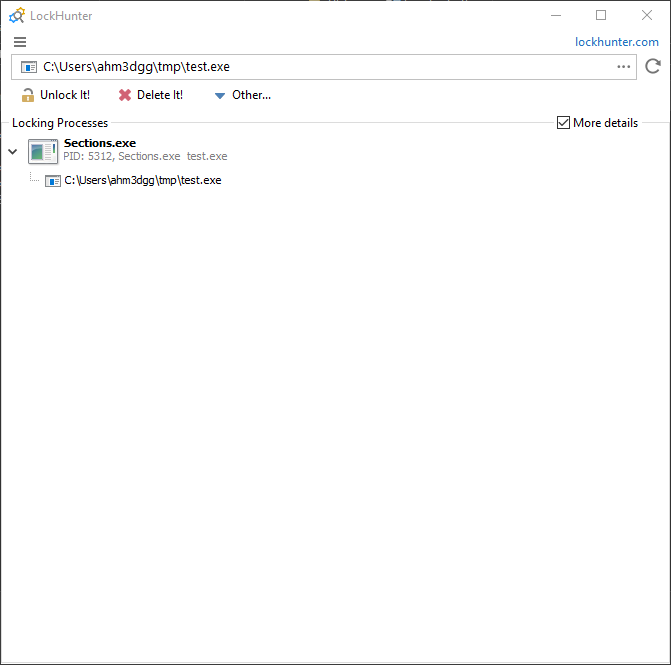
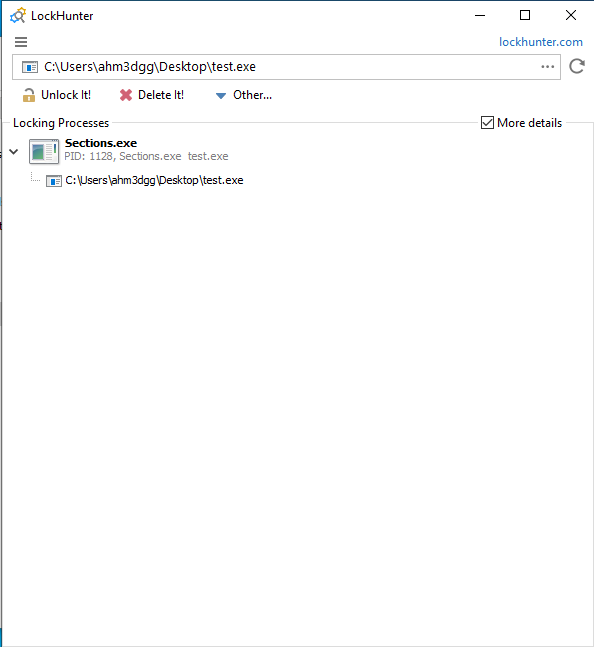
Here we can see that LockHunter indicates that Sections.exe is locking test.exe. It also shows one instance of test.exe—what LockHunter is indicating here is that Sections.exe is holding one handle to the file named test.exe.
If you try renaming or deleting that file you won’t be able to; or opening it in 010 Editor you will see this lock on the file.
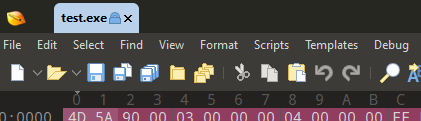
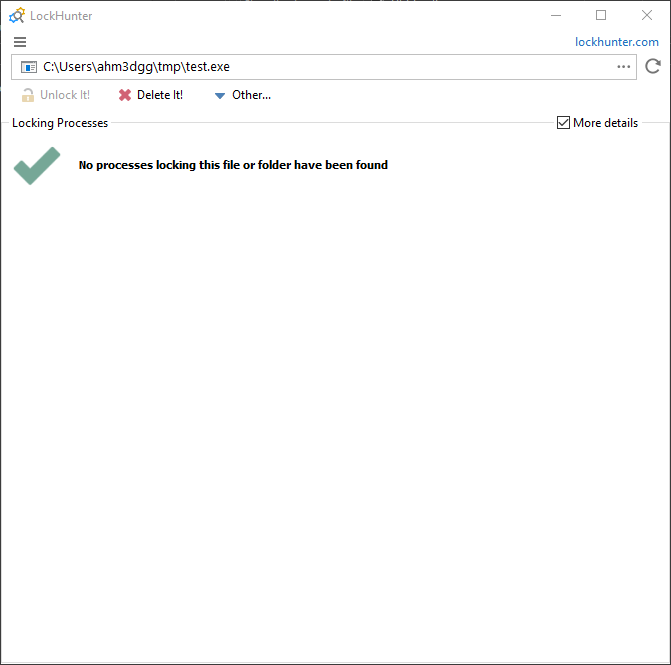
So maybe let’s try closing the file handle and see if that works—and run LockHunter on the file again. When we do, we’re faced with the green checkmark; surely the file is unlocked and we can do whatever we want.
Okay, now I am able to rename and copy the file. Let’s try deleting it.
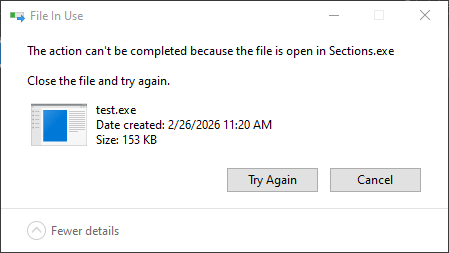
Oh no—I can’t. But Explorer tells us the name of the process that is using the file, which is helpful.
Okay, let’s see if I can write to the file by opening it in 010 Editor. I’m still faced with the lock on the file (it’s not the same image—trust me, I’m not lying).
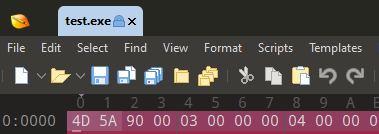
In the example code above, closing the section handle also won’t solve our problem because we mapped the section. If we hadn’t mapped the section, closing the section handle would solve the problem; At this point I would probably just terminate the program or unmap the section. Tools like System Informer give us more visibility into this.

So what about bringing that visibility into LockHunter? Maybe from a practical perspective it’s not worth the effort and I could just use System Informer, but I really wanted to use this project as a learning exercise. It allowed me to get more into Windows kernel development and reverse engineering drivers.
In the following subsections I describe how I added visibility of section handles into LockHunter.
LockHunter Bird’s Eye View Reverse Engineering
LockHunter is written in Delphi, as we can see from Detect It Easy Tool.
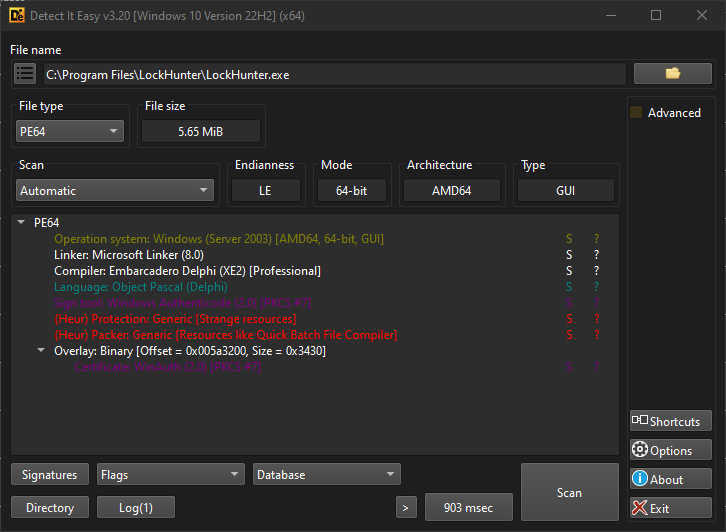
I also think that looking at LockHunter’s folder is a good place to start, since we can start identifying the files it uses.
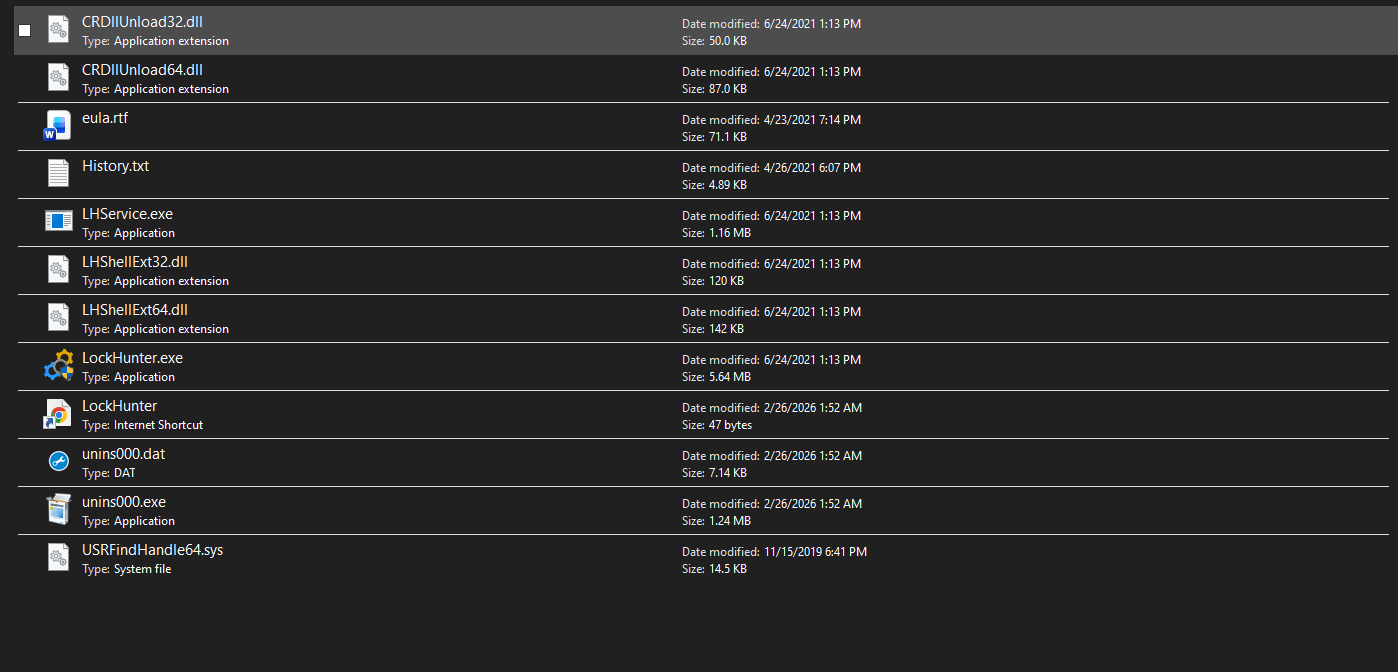
Here we can see the main executable among other files, some DLLs for the shell extension for the context menu, and what caught my attention: the driver USRFindHandle64.sys. Its name suggests it finds handles; but at this point we don’t yet know exactly what it does.
We can also see some other files like LHService.exe, a service used to facilitate deleting a file after the next reboot.
We have to start somewhere. Perhaps we can try to answer some concrete questions:
- How does LockHunter query system handles?
- How does LockHunter close a handle?
How does LockHunter query system handles?
To answer this question—especially when reverse-engineering a relatively large program like this—it’s helpful to flip roles and think like a forward engineer. The question really becomes: how can we query system handles on Windows?
If you search for that, you’ll soon find NtQuerySystemInformation, which has the following definition (which I took from ntdoc):
NTSYSCALLAPI
NTSTATUS
NTAPI
NtQuerySystemInformation(
    _In_ SYSTEM_INFORMATION_CLASS SystemInformationClass,
    _Out_writes_bytes_opt_(SystemInformationLength) PVOID SystemInformation,
    _In_ ULONG SystemInformationLength,
    _Out_opt_ PULONG ReturnLength
    );
This is a native API that does what it says: queries system-wide information. This function works by providing it a System Information Class—basically a number that tells the function what kind of information you want. One such information class is SystemHandleInformation, which allows us to query all system handles (literally all of them, including handles in the System process). The returned data has the following structure:
typedef struct _SYSTEM_HANDLE_INFORMATION
{
    ULONG NumberOfHandles;
    _Field_size_(NumberOfHandles) SYSTEM_HANDLE_TABLE_ENTRY_INFO Handles[1];
} SYSTEM_HANDLE_INFORMATION, *PSYSTEM_HANDLE_INFORMATION;

// Note: This information class is deprecated since values are limited to 65535. Use SystemExtendedHandleInformation instead.
typedef struct _SYSTEM_HANDLE_TABLE_ENTRY_INFO
{
    USHORT UniqueProcessId;
    USHORT CreatorBackTraceIndex;
    UCHAR ObjectTypeIndex;
    UCHAR HandleAttributes;
    USHORT HandleValue;
    PVOID Object;
    ACCESS_MASK GrantedAccess;
} SYSTEM_HANDLE_TABLE_ENTRY_INFO, *PSYSTEM_HANDLE_TABLE_ENTRY_INFO;
A few interesting fields in this structure that matter most for us:
- UniqueProcessId: The process owning that handle
- ObjectTypeIndex: The ID of the object type the handle refers to (File, Section, Registry Key, …)
- HandleValue: The actual handle value
- Object: Kernel address of the object the handle refers to
It’s important to note that although the field Object holds the kernel address of the object, user-mode programs calling this function cannot read or write that address. This is because, although the kernel is mapped into every process for performance reasons (such as avoiding page table swaps and TLB flushes), the page table entries for the kernel are marked as supervisor-only and are accessible only from kernel mode. User-mode programs can read the address and send it to a kernel driver, which can then read or write on their behalf.
As ntdoc also warns, this information class is deprecated; we should use SystemExtendedHandleInformation instead. The reason is that HandleValue is only 16 bits (limited to 65535 values); SystemExtendedHandleInformation uses 64-bit handle values on 64-bit systems and 32-bit on 32-bit systems.
So now we have some information. We can fire up IDA Pro and look for calls to this function. I started by examining the Import Address Table—and yes, I found it.

In user mode, Nt and Zw are equivalent; ZwQuerySystemInformation maps to NtQuerySystemInformation in NTDLL’s export table.
ZwQuerySystemInformation is called from one function, which I named QuerySystemInformation at 0x0640EE0.
PVOID __fastcall QuerySystemInformation(SYSTEM_INFORMATION_CLASS InformationClass)
{
  ULONG ReturnLength; // [rsp+20h] [rbp+20h] BYREF
  NTSTATUS i; // [rsp+24h] [rbp+24h]
  PVOID SystemInformation; // [rsp+28h] [rbp+28h] BYREF
  ULONG SystemInformationLength; // [rsp+34h] [rbp+34h]
  __int64 vars38; // [rsp+38h] [rbp+38h]

  vars38 = 0;
  SystemInformationLength = 0xFFFF;
  SystemInformation = Alloc(0xFFFF);
  for ( i = ZwQuerySystemInformation(InformationClass, SystemInformation, 0xFFFFu, &ReturnLength);
		i == STATUS_INFO_LENGTH_MISMATCH;
		i = ZwQuerySystemInformation(InformationClass, SystemInformation, SystemInformationLength, &ReturnLength) )
  {
	SystemInformationLength *= 2;
	ReAlloc(&SystemInformation, SystemInformationLength);
  }
  if ( !i )
	return SystemInformation;
  sub_405AB0(SystemInformation);
  return vars38;
}
To understand what it’s doing, we need to understand how ZwQuerySystemInformation works. You pass it a pointer to a buffer and the buffer size; if the buffer isn’t large enough it returns STATUS_INFO_LENGTH_MISMATCH. So the code allocates in a loop, doubling the size each time until the call succeeds.
Following cross-references to QuerySystemInformation, we see it’s called from a function the programmer named ScanForLockingHandles at 0x6412D0, I knew this from the logging message, which is helpful I used logging messages before when reverse engineering such programs :D
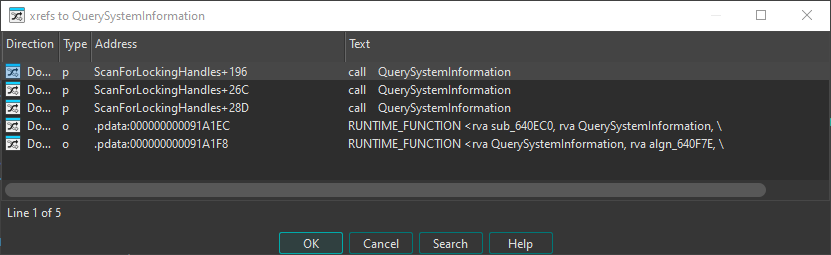

Let’s focus on the relevant parts of this function. The first relevant thing it does is obtain the file object type index. Each Windows executive object has an ID that identifies its type (e.g. on Windows 10, File has ID 37 and Section has ID 42). This ID can change between Windows versions.
To obtain it without hardcoding (since IDs can change), LockHunter uses a neat trick:
NULFileHandle = CreateFileW_0(L"NUL", 0x80000000, 0, 0, 3u, 0, 0);

if ( NULFileHandle == INVALID_HANDLE_VALUE )
{
	ReportWin32Error();
}

SystemInformation = QuerySystemInformation(SystemHandleInformation);

if ( !SystemInformation )
{
	ReportWin32Error();
}

CurrentProcessId = GetCurrentProcessId_0();
HandleCount = SystemInformation->NumberOfHandles - 1;
i = 0;

if ( HandleCount >= 0 )
{
	++HandleCount;
	while ( *&SystemInformation->Handles[i].UniqueProcessId != CurrentProcessId || SystemInformation->Handles[i].HandleValue != NULFileHandle )
	{
		if ( ++i == HandleCount )
		{
			goto LABEL_16;
		}
	}
	FileObjectTypeIndex = SystemInformation->Handles[i].ObjectTypeIndex;
}
Here the function opens a handle to the Windows NUL device (similar to /dev/null on Linux). It then queries all system handles and loops until it finds the handle entry for that NUL device. Since NUL is a File object, it uses that entry’s ObjectTypeIndex, which will be the same for all file objects on the system.
The next part of the code queries system handle information again (I don’t know why—they could have used the previous result). Regardless, the function filters out handles that belong to our process and handles that don’t refer to files, then calls a function I named QueryFileObjectInfo at 0x0643DB0, which we’ll discuss below.
  ProcessInformation = QuerySystemInformation(SystemProcessInformation);
  if ( ProcessInformation )
  {
    SystemInformation = QuerySystemInformation(SystemHandleInformation);
    if ( SystemInformation )
    {
      *(a1 + 0x70) = 0;
      *(a1 + 0x78) = SystemInformation->NumberOfHandles;
      *(a1 + 0x74) = 1;
      *(a1 + 0x98) = SystemInformation->NumberOfHandles;
      *(a1 + 0x94) = 0;
      v8 = SystemInformation->NumberOfHandles - 1;
      i = 0;
      if ( v8 >= 0 )
      {
        v9 = v8 + 1;
        while ( 1 )
        {
          if ( SystemInformation->Handles[i].ObjectTypeIndex != FileObjectTypeIndex
            || *&SystemInformation->Handles[i].UniqueProcessId == hProcess.dwProcessId )
          {
            goto NextHandleEntry;
          }
          ++*(a1 + 0x94);
          if ( *(a1 + 0x15) )
          {
            sub_6419E0(0, vars58);
            sub_641A10(0, vars58);
            sub_641A40(0, vars58);
            sub_641A60(0, vars58);
            sub_641B00(0, vars58);
            goto LABEL_45;
          }
          v10 = sub_640DC0();
          if ( !QueryFileObjectInfo(v10, &SystemInformation->Handles[i], &vars78, &vars80) )
            goto NextHandleEntry;
Understanding QueryFileObjectInfo requires looking at the driver. In brief: the function takes a pointer to the handle entry from NtQuerySystemInformation, reads the kernel object address from the Object field, copies it into the IOCTL input buffer, and sends an IOCTL to the kernel driver USRFindHandle64.sys.
__int64 __fastcall QueryFileObjectInfo(
        __int64 LockHunterCtx,
        PSYSTEM_HANDLE_TABLE_ENTRY_INFO pHandleEntry,
        __int64 DiskVolumePath,
        __int64 FilePath)
{
  __int64 v4; // rax
  BOOL Result; // eax
  DWORD BytesReturned; // [rsp+44h] [rbp+44h] BYREF
  bool vars48; // [rsp+48h] [rbp+48h]
  _HUNTER_QUERY_FILE_OBJECT_INFO_RESPONSE OutBuffer; // [rsp+49h] [rbp+49h] BYREF
  PVOID InBuffer; // [rsp+48Fh] [rbp+48Fh] BYREF
  struct _SYSTEM_HANDLE_TABLE_ENTRY_INFO HandleEntry; // [rsp+498h] [rbp+498h]

  HandleEntry = *pHandleEntry;
  if ( *(LockHunterCtx + 0x28) != 1 )
  {
    LOBYTE(pHandleEntry) = 1;
    v4 = sub_43A3A0(off_426AB8, pHandleEntry, L"The driver should be initialized before its using");
    sub_40AF20(v4);
  }
  BytesReturned = 0;
  SetMemory(&OutBuffer.FilePathPresent, 0x446, 0);
  InBuffer = HandleEntry.Object;
  Result = DeviceIoControl(*(LockHunterCtx + 8), dwIoControlCode, &InBuffer, 8u, &OutBuffer, 0x446u, &BytesReturned, 0);
  vars48 = Result;
  if ( Result )
  {
    if ( OutBuffer.FilePathPresent || OutBuffer.DiskVolumePresent )
    {
      CopyString(DiskVolumePath, OutBuffer.DiskVolumePath);
      CopyString(FilePath, OutBuffer.FilePath);
      return 1;
    }
    else
    {
      return 0;
    }
  }
  else
  {
    sub_5EF730(L"Cannot convert handle to file name, using driver");
    return 0;
  }
}
It wasn’t entirely clear to me statically what the IOCTL code was, so I placed a breakpoint on DeviceIoControl to see the following arguments, so let’s look at how DeviceIoControl gets called.
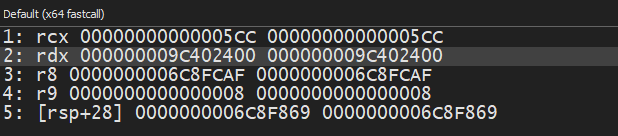
DeviceIoControl has the following definition
BOOL DeviceIoControl(
  [in]                HANDLE       hDevice,
  [in]                DWORD        dwIoControlCode,
  [in, optional]      LPVOID       lpInBuffer,
  [in]                DWORD        nInBufferSize,
  [out, optional]     LPVOID       lpOutBuffer,
  [in]                DWORD        nOutBufferSize,
  [out, optional]     LPDWORD      lpBytesReturned,
  [in, out, optional] LPOVERLAPPED lpOverlapped
);
Following the x64 calling convention, dwIoControlCode should be in RDX, which in this case contains 0x9C402400. We’ll look at how IOCTLs are encoded in the next section.
At this point we have the following information:
- It uses
NtQuerySystemInformationto query all system handles - It only cares about file handles
- It sends an IOCTL with an input buffer containing a file object kernel address
Analyzing USRFindHandle64.sys
The Driver starts at DriverEntry function
NTSTATUS __stdcall DriverEntry(PDRIVER_OBJECT DriverObject, PUNICODE_STRING RegistryPath)
{
  PDRIVER_CONTEXT DeviceExtension; // rcx
  PDEVICE_OBJECT DriverContext; // [rsp+28h] [rbp-20h] BYREF
  NTSTATUS Status; // [rsp+30h] [rbp-18h]

  DriverObject->MajorFunction[IRP_MJ_CREATE] = IrpHandler;
  DriverObject->MajorFunction[IRP_MJ_CLOSE] = IrpHandler;
  DriverObject->MajorFunction[IRP_MJ_DEVICE_CONTROL] = IrpHandler;
  DriverObject->DriverUnload = DriverUnload;
  Status = CreateDevice(L"\\Device\\USR_Find_Handle0", 0x9C40u, DriverObject, &DriverContext);
  if ( Status >= 0 )
  {
    DeviceExtension = DriverContext->DeviceExtension;
    DeviceExtension->DeviceObject = DriverContext;
    DeviceExtension->DeviceType = 0x9C40;
  }
  return Status;
}
DriverEntry sets the IRP handlers in the driver’s dispatch table, so when the user-mode application communicates with the driver the kernel knows which functions to call. It also registers an unload routine and creates a device object. Here we can see the path \\Device\\USR_Find_Handle0—this is what the user-mode application uses. The application typically opens a handle to this device using NtOpenFile for instance it then obtains a file handle, and passes it to DeviceIoControl or NtDeviceIoControlFile.
IrpHandler is the most important function here. Here is a cleaned-up decompilation:
NTSTATUS __stdcall IrpHandler(PDEVICE_OBJECT DeviceObject, IRP *Irp)
{
  PIO_STACK_LOCATION IoStackLocation; // [rsp+20h] [rbp-28h]
  NTSTATUS Status; // [rsp+28h] [rbp-20h]
  PVOID DeviceContext; // [rsp+30h] [rbp-18h]
  UCHAR MajorFunction; // [rsp+38h] [rbp-10h]
  ULONG IoControlCode; // [rsp+3Ch] [rbp-Ch]

  Irp->IoStatus.Information = 0;
  DeviceContext = DeviceObject->DeviceExtension;
  IoStackLocation = Irp->Tail.Overlay.CurrentStackLocation;
  Status = STATUS_NOT_IMPLEMENTED;
  MajorFunction = IoStackLocation->MajorFunction;
  if ( !IoStackLocation->MajorFunction || MajorFunction == IRP_MJ_CLOSE )
  {
    Status = STATUS_SUCCESS;
  }
  else if ( MajorFunction == IRP_MJ_DEVICE_CONTROL )
  {
    IoControlCode = IoStackLocation->Parameters.DeviceIoControl.IoControlCode;
    switch ( IoControlCode )
    {
      case IOCTL_QUERY_FILE_OBJECT_INFO:
        Status = UsrQueryFileObjectInfo(DeviceContext, Irp, IoStackLocation);
        break;
      case IOCTL_WRITE_SOME_U32_VALUE:
        Status = UsrWritesSomeU32Value(DeviceContext, Irp, IoStackLocation);
        break;
      case IOCTL_CLOSE_HANDLE_IN_CURRENT_PROCESS:
        Status = UsrCloseHandle(DeviceContext, Irp, IoStackLocation);
        break;
    }
  }
  Irp->IoStatus.Status = Status;
  IofCompleteRequest(Irp, 0);
  return Status;
}
I’ve given names to the IOCTLs:
enum USR_IOCTLS
{
	IOCTL_QUERY_FILE_OBJECT_INFO = 0x9C402400,
	IOCTL_WRITE_SOME_U32_VALUE = 0x9C402404,
	IOCTL_CLOSE_HANDLE_IN_CURRENT_PROCESS = 0x9C402408,
};
We’ve seen that the user-mode application sends an IOCTL with code 0x9C402400. I haven’t seen the others being called, and I don’t know what the second one is for.
Now let’s look at UsrQueryFileObjectInfo, since that’s what the user-mode application uses. Here is a cleaned decompilation:
NTSTATUS __stdcall UsrQueryFileObjectInfo(PVOID DeviceContext, PIRP Irp, PIO_STACK_LOCATION IoStackLocation)
{
  PHUNTER_QUERY_FILE_OBJECT_INFO_RESPONSE SystemBuffer; // [rsp+30h] [rbp-58h]
  PDEVICE_OBJECT Object; // [rsp+40h] [rbp-48h]
  PFILE_OBJECT FileObject; // [rsp+58h] [rbp-30h]
  POBJECT_NAME_INFORMATION ObjectNameInfo; // [rsp+60h] [rbp-28h]
  ULONG ReturnLength; // [rsp+68h] [rbp-20h] BYREF
  unsigned int Length; // [rsp+6Ch] [rbp-1Ch]
  unsigned int ObjectNameLength; // [rsp+70h] [rbp-18h]

  SystemBuffer = (PHUNTER_QUERY_FILE_OBJECT_INFO_RESPONSE)Irp->AssociatedIrp.SystemBuffer;
  if ( IoStackLocation->Parameters.DeviceIoControl.InputBufferLength != 8
    || IoStackLocation->Parameters.Read.Length != sizeof(_HUNTER_QUERY_FILE_OBJECT_INFO_RESPONSE) )
  {
    return STATUS_INVALID_PARAMETER;
  }
  FileObject = *(PFILE_OBJECT *)Irp->AssociatedIrp.SystemBuffer;
  SystemBuffer->FilePathPresent = 0;
  SystemBuffer->DiskVolumePresent = 0;
  if ( FileObject->Type != 5 )
    return STATUS_INVALID_PARAMETER;
  SystemBuffer->Type = FileObject->Type;
  SystemBuffer->Size = FileObject->Size;
  SystemBuffer->DeviceObject = FileObject->DeviceObject;
  SystemBuffer->LockOperation = FileObject->LockOperation;
  SystemBuffer->DeletePending = FileObject->DeletePending;
  SystemBuffer->ReadAccess = FileObject->ReadAccess;
  SystemBuffer->WriteAccess = FileObject->WriteAccess;
  SystemBuffer->DeleteAccess = FileObject->DeleteAccess;
  SystemBuffer->SharedRead = FileObject->SharedRead;
  SystemBuffer->SharedWrite = FileObject->SharedWrite;
  SystemBuffer->SharedDelete = FileObject->SharedDelete;
  SystemBuffer->Flags = FileObject->Flags;
  SystemBuffer->CurrentByteOffset = FileObject->CurrentByteOffset.QuadPart;
  SystemBuffer->Waiters = FileObject->Waiters;
  SystemBuffer->Busy = FileObject->Busy;
  if ( FileObject->FileName.Length <= 0x200u )
    Length = FileObject->FileName.Length;
  else
    Length = 0x200;
  memset(SystemBuffer->FileName, 0, sizeof(SystemBuffer->FileName));
  memmove(SystemBuffer->FileName, FileObject->FileName.Buffer, Length);
  SystemBuffer->FilePathPresent = 1;
  Object = FileObject->DeviceObject;
  if ( Object->Type == 3 )
  {
    SystemBuffer->DeviceObject_Type = Object->Type;
    SystemBuffer->DeviceObject_Size = Object->Size;
    SystemBuffer->DeviceObject_RefCount = Object->ReferenceCount;
    SystemBuffer->DriverObject = Object->DriverObject;
    SystemBuffer->DeviceObject_Flags = Object->Flags;
    SystemBuffer->DeviceObject_Characteristics = Object->Characteristics;
    SystemBuffer->DeviceObject_DeviceType = Object->DeviceType;
    memset(SystemBuffer->DiskVolumePath, 0, sizeof(SystemBuffer->DiskVolumePath));
    ObjectNameInfo = (POBJECT_NAME_INFORMATION)ExAllocatePool(PagedPool, 0x200u);
    if ( ObjectNameInfo )
    {
      ObjectNameInfo->Name.MaximumLength = 0x1F8;
      if ( ObQueryNameString(Object, ObjectNameInfo, 0xFCu, &ReturnLength) >= 0 )
      {
        if ( ObjectNameInfo->Name.Length <= 512u )
          ObjectNameLength = ObjectNameInfo->Name.Length;
        else
          ObjectNameLength = 512;
        memmove(SystemBuffer->DiskVolumePath, ObjectNameInfo->Name.Buffer, ObjectNameLength);
      }
      ExFreePoolWithTag(ObjectNameInfo, 0);
    }
    SystemBuffer->DiskVolumePresent = 1;
  }
  Irp->IoStatus.Information = sizeof(_HUNTER_QUERY_FILE_OBJECT_INFO_RESPONSE);
  return 0;
}
Before digging into the function, let’s take a moment to understand how IOCTLs are encoded. We can use a tool like the Zezula IOCTL Decoder:
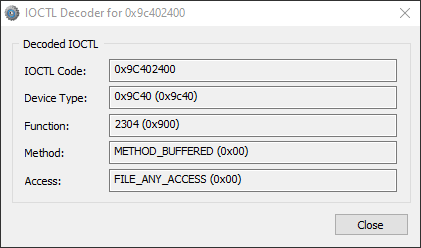
Here is a description of what you’re looking at:
-
Device Type: The device type you set when calling
IoCreateDevice. One driver can create multiple device objects (e.g. a network driver liketcpip.syscan create one for each protocol: TCP, UDP, IP, RawIP). -
Function: Identifies the action to take (in this example, query file object info).
-
Method: Identifies how the user-mode application and driver perform I/O. Here we have
METHOD_BUFFERED(buffered I/O): for writes, the kernel copies the user input buffer into a system buffer from non-paged pool; for reads, it copies the system buffer back to the user buffer. The same system buffer is used for both input and output, and a pointer to it can be obtained fromIrp->AssociatedIrp.SystemBuffer; its size is the maximum of the input and output buffer sizes. Other methods are documented on MSDN. -
Access: The access required when opening the device (e.g.
FILE_ANY_ACCESS,FILE_READ_DATA,FILE_WRITE_DATA).
Going back to UsrQueryFileObjectInfo: we know it uses buffered I/O, and from reversing the user-mode app we know it sends the kernel address of a file object. We can start applying types in IDA so the decompilation is cleaner, so for instance if you look at the decompilation above I have set the type of FileObject to be PFILE_OBJECT, this variable value is read from the SystemBuffer
FileObject = *(PFILE_OBJECT*)*Irp->AssociatedIrp.SystemBuffer;After doing that, the output looks much cleaner. We can then also start forming the structure of the response being sent back to the usermode application.
typedef struct _HUNTER_QUERY_FILE_OBJECT_INFO_RESPONSE
{
	BOOLEAN FilePathPresent;
	UINT16 Type;
	UINT16 Size;
	PVOID DeviceObject;
	BOOLEAN LockOperation;
	BOOLEAN DeletePending;
	BOOLEAN ReadAccess;
	BOOLEAN WriteAccess;
	BOOLEAN DeleteAccess;
	BOOLEAN SharedRead;
	BOOLEAN SharedWrite;
	BOOLEAN SharedDelete;
	UINT32 Flags;
	UINT64 CurrentByteOffset;
	UINT32 Waiters;
	UINT32 Busy;
	WCHAR FilePath[256];
	BOOLEAN DiskVolumePresent;
	UINT16 DeviceObject_Type;
	UINT16 DeviceObject_Size;
	UINT32 DeviceObject_RefCount;
	PVOID DriverObject;
	UINT32 DeviceObject_Flags;
	UINT32 DeviceObject_Characteristics;
	UINT32 DeviceObject_DeviceType;
	WCHAR DiskVolumePath[256];
}HUNTER_QUERY_FILE_OBJECT_INFO_RESPONSE, * PHUNTER_QUERY_FILE_OBJECT_INFO_RESPONSE;
This is largely copied from FILE_OBJECT, with the exception of FilePathPresent and DiskVolumePresent. If we go back to the user-mode application and apply this struct, we see that it checks FilePathPresent and DiskVolumePresent before using FilePath and DiskVolumePath. Here, FILE_OBJECT.FileName.Buffer contains the path without the volume (e.g. \Users\ahm3dgg\tmp\test.exe). The driver also queries the Disk volume path in the object manager by passing the Device Object associated with File Object to ObQueryNameString; the result of this function will be like \Device\HarddiskVolume3. These two are combined in the user-mode application and translated to something like C:\Users\ahm3dgg\tmp\test.exe.
  Result = DeviceIoControl(*(LockHunterCtx + 8), dwIoControlCode, &InBuffer, 8u, &OutBuffer, 0x446u, &BytesReturned, 0);
  vars48 = Result;
  if ( Result )
  {
    if ( OutBuffer.FilePathPresent || OutBuffer.DiskVolumePresent )
    {
      CopyString(DiskVolumePath, OutBuffer.DiskVolumePath);
      CopyString(FilePath, OutBuffer.FilePath);
      return 1;
    }
    else
    {
      return 0;
    }
  }
We can also see it reads 0x446 (1094) bytes, which matches the size of the struct. The driver validates that and that the input buffer is 8 bytes which is the size of a pointer on x64 bit systems.
So now we know the driver’s role: it is used to query file-object information. The most important parts are the file path and the physical disk volume path in the object manager. The user-mode application can then compare the locked file path with this information and identify which process owns the handle since it also got the process id associated with the handle.
The comparison of the locked file path with the received path from the driver is done in sub_00646110, which I have given the name CheckLockedFilePathAgainstFilePath This function is called right after calling QueryFileObjectInfo. It’s a bit hard to follow statically because it relies on a context struct I didn’t fully reverse. so I placed a breakpoint on it and stepped through it; the locked file path eventually appears in memory, it gets passed to sub_048A960 which takes two arguments: the locked file path and the path returned from the driver. Inside, it calls CompareStringW with NORM_IGNORECASE for a case-insensitive comparison.
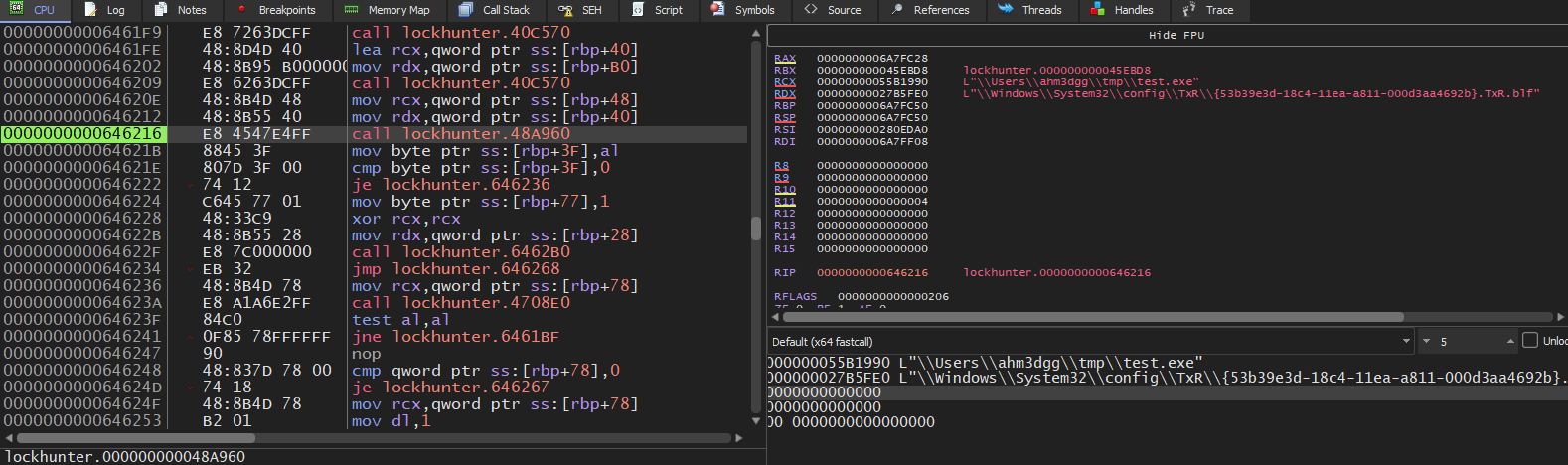
If CheckLockedFilePathAgainstFilePath succeeds, the code loops through all processes using the information got from QuerySystemInformation(SystemProcessInformation) (we saw this earlier but didn’t discuss it):
	ProcessLockingFile = ProcessInformation;
	while ( LODWORD(ProcessLockingFile->UniqueProcessId) != *&SystemInformation->Handles[i].UniqueProcessId )
	{
	  ProcessLockingFile = (ProcessLockingFile + ProcessLockingFile->NextEntryOffset);
	  if ( !ProcessLockingFile->NextEntryOffset )
		goto LABEL_30;
	}
	sub_40D820(&vars98, ProcessLockingFile->ImageName.Buffer);
At the end it calls sub_064185C, passing the process name and the locked file path. I didn’t dig into that; I assume it builds some table for linking the process locking the file, to the locked file.
How does LockHunter close handles?
As with querying handles, I didn’t know how you would close a handle in another process. I looked at System Informer’s code and found this blog post by Pavel Yosifovich.
The trick is using NtDuplicateObject, which has the following definition:
NTSYSCALLAPI
NTSTATUS
NTAPI
NtDuplicateObject(
    _In_ HANDLE SourceProcessHandle,
    _In_ HANDLE SourceHandle,
    _In_opt_ HANDLE TargetProcessHandle,
    _Out_opt_ PHANDLE TargetHandle,
    _In_ ACCESS_MASK DesiredAccess,
    _In_ ULONG HandleAttributes,
    _In_ ULONG Options
    );
NtDuplicateObject duplicates a handle from one process to another. The handle to duplicate is SourceHandle. It also can be configured with Options the option relevant to us is DUPLICATE_CLOSE_SOURCE which according to ntdoc:
DUPLICATE_CLOSE_SOURCE: instructs the system to close the source handle. Note that this occurs regardless of any error status returned. The target handle parameter becomes optional when using this flag.
I followed the same method as above, and looked for NtDuplicateObject in the IAT to find out that LockHunter calls NtDuplicateObject at sub_0643460, which I renamed to CloseRemoteHandle:
__int64 __fastcall CloseRemoteHandleInternal(HANDLE SourceHandle, DWORD SourcePID)
{
  __int64 v2; // r8
  __int64 v3; // r9
  __int64 _0[5]; // [rsp+0h] [rbp+0h] BYREF
  __int64 *vars48; // [rsp+48h] [rbp+48h]
  unsigned __int8 vars5F; // [rsp+5Fh] [rbp+5Fh]
  HANDLE SourceProcessHandle; // [rsp+60h] [rbp+60h]
  NTSTATUS vars6C; // [rsp+6Ch] [rbp+6Ch]

  vars48 = _0;
  SourceProcessHandle = OpenProcess_0(0x1FFFFFu, 0, SourcePID);
  if ( NtDuplicateObject(SourceProcessHandle, SourceHandle, 0, 0, 0, 0, DUPLICATE_CLOSE_SOURCE) )
  {
    vars5F = 0;
    sub_643500(0, vars48, v2, v3, _0[4]);
  }
  else
  {
    vars6C = NtClose(SourceProcessHandle);
    return vars6C == 0;
  }
  return vars5F;
}
We can see it opens a handle to the source process, then calls NtDuplicateObject with DUPLICATE_CLOSE_SOURCE, which closes the source handle as we already mentioned above, There’s no need to specify a target handle when we only want to close the source.
I then launched LockHunter on a locked file, then attached to LockHunter via x64dbg, placed a breakpoint on NtDuplicateObject, and chose Unlock Selected Process, we can then inspect the arguments passed
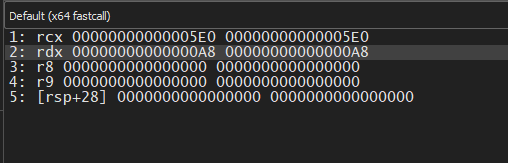
We can use System Informer to interpret what we’re seeing:

We can see the handle value is 0xA8, which matches what we see in RDX. After returning from NtDuplicateObject, the handle is closed and LockHunter shows its green checkmark—but we know the file still isn’t unlocked.
Enough reverse engineering. You may have already seen how to modify the program without going this deep; I did too, but I wanted to make the post longer and more informative :)
Planning the attack
By now you likely understand the problem: LockHunter only looks for handles that refer to files, but files can also be locked when you open section handles, and when you map them. So how do we fix it? we need to modify both the usermode application and the kernel mode driver.
User-mode: We can add a hook point so the code not only checks for file handles but also section handles. Then the user-mode app will send both file and section object addresses to the driver.
Kernel-mode: I rewrote the driver so it can handle section objects as well as file objects.
But first, some limitations. As mentioned, if the section is mapped, even after closing the file and section handle the file can still be locked. We still have that limitation here. What we add is visibility: the user-mode app can send us section object addresses and we return which file backs that section. That’s still useful—you’ll know which process holds the section handle (so you can terminate it), and if a buggy program unmapped the section views but forgot to close the handle, closing the section handle will unlock the file. That isn’t to say that supporting unmapping the view is impossible, but it would require more involved changes to both the user-mode app and the driver, which was outside my scope.
Hooking the user-mode application
Where do we add the hook? In ScanForLockingHandles, look at the comparison of the object type index:
.text:0000000000641601                 movzx   rax, byte ptr [rax+rcx*8+0Ch]
.text:0000000000641607                 cmp     al, [rbp+FileObjectTypeIndex]
.text:000000000064160D                 jnz     loc_641861
.text:0000000000641613                 mov     rax, [rbp+var_sE8]
We can see it’s reading HandleEntry.ObjectTypeIndex and comparing it to FileObjectTypeIndex. If they’re not equal it jumps to loc_641861.
We can patch the jnz instruction so it jumps to our code instead, that will check if the current handle entry has the object type index of a Section object, if it was we can jump to 0x0641613, which the location just after the jnz instruction, and if it wasn’t we can skip the handle entry, and jump to the original jump target loc_641861.
The stub shoud look something like this:
cmp al, 42       // Compare against Section object type index (varies across different Windows versions)
jz loc_0641613          // Process the handle entry
jmp loc_641861          // Handle is neither file nor section; skip it
To install our hook, I used DLL hijacking. I ran Procmon, looked for NAME_NOT_FOUND errors, and found version.dll among others.
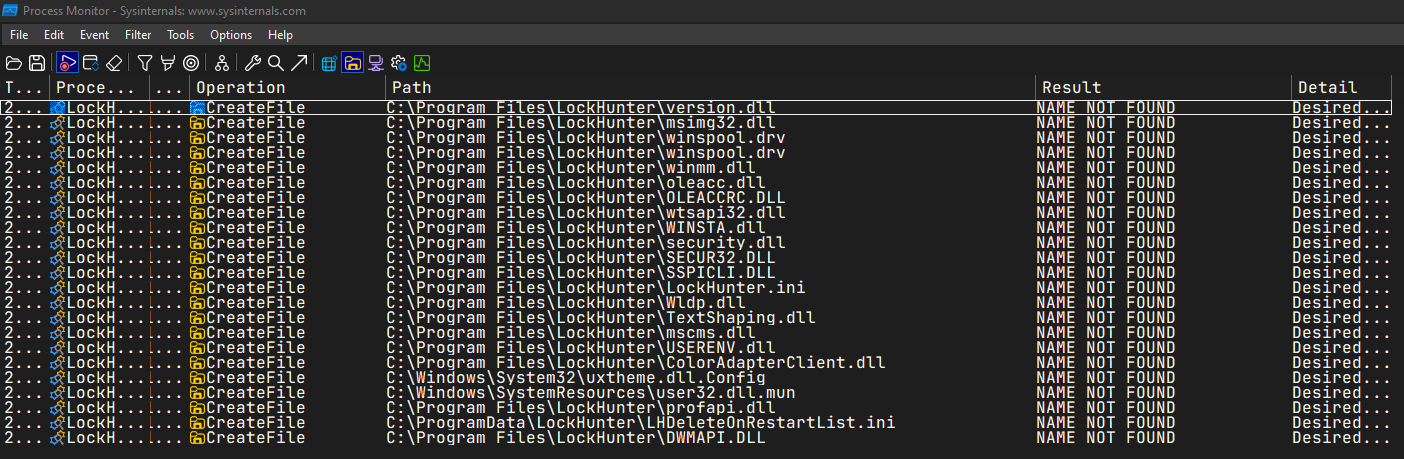
We can then place our DLL next to LockHunter, give it the name version.dll and it will get loaded. We must also proxy all calls to the real version.dll so we don’t break the application. I’ll leave you to reason through the code; I recommend using ZydisInfo.exe from the Zydis Project to decode the instructions and understand their structure—that’s what I did.
#pragma comment(linker,"/export:GetFileVersionInfoA=C:\\Windows\\System32\\version.GetFileVersionInfoA,@1")
#pragma comment(linker,"/export:GetFileVersionInfoByHandle=C:\\Windows\\System32\\version.GetFileVersionInfoByHandle,@2")
#pragma comment(linker,"/export:GetFileVersionInfoExA=C:\\Windows\\System32\\version.GetFileVersionInfoExA,@3")
#pragma comment(linker,"/export:GetFileVersionInfoExW=C:\\Windows\\System32\\version.GetFileVersionInfoExW,@4")
#pragma comment(linker,"/export:GetFileVersionInfoSizeA=C:\\Windows\\System32\\version.GetFileVersionInfoSizeA,@5")
#pragma comment(linker,"/export:GetFileVersionInfoSizeExA=C:\\Windows\\System32\\version.GetFileVersionInfoSizeExA,@6")
#pragma comment(linker,"/export:GetFileVersionInfoSizeExW=C:\\Windows\\System32\\version.GetFileVersionInfoSizeExW,@7")
#pragma comment(linker,"/export:GetFileVersionInfoSizeW=C:\\Windows\\System32\\version.GetFileVersionInfoSizeW,@8")
#pragma comment(linker,"/export:GetFileVersionInfoW=C:\\Windows\\System32\\version.GetFileVersionInfoW,@9")
#pragma comment(linker,"/export:VerFindFileA=C:\\Windows\\System32\\version.VerFindFileA,@10")
#pragma comment(linker,"/export:VerFindFileW=C:\\Windows\\System32\\version.VerFindFileW,@11")
#pragma comment(linker,"/export:VerInstallFileA=C:\\Windows\\System32\\version.VerInstallFileA,@12")
#pragma comment(linker,"/export:VerInstallFileW=C:\\Windows\\System32\\version.VerInstallFileW,@13")
#pragma comment(linker,"/export:VerLanguageNameA=C:\\Windows\\System32\\version.VerLanguageNameA,@14")
#pragma comment(linker,"/export:VerLanguageNameW=C:\\Windows\\System32\\version.VerLanguageNameW,@15")
#pragma comment(linker,"/export:VerQueryValueA=C:\\Windows\\System32\\version.VerQueryValueA,@16")
#pragma comment(linker,"/export:VerQueryValueW=C:\\Windows\\System32\\version.VerQueryValueW,@17")

#include <phnt_windows.h>
#include <phnt.h>

#define IMAGE_LOCATE_NT_HEADERS(base) PIMAGE_NT_HEADERS(SIZE_T(base) + PIMAGE_DOS_HEADER(base)->e_lfanew)

#pragma pack(1)
struct Stub
{
	UINT8 _00[2] = { 0x3C, 0x2A };		// cmp al, 42
	UINT8 _01[2] = { 0x0F, 0x84 };		// jz
	UINT32 jz_relative_disp;			// (0x241613 - (base + 2))
	UINT8 _02[1] = { 0xE9 };			// jmp
	UINT32 jmp_relative_disp;			// (0x241861 - (base + 8))
};

void WriteExecutableCode(PVOID Base, PVOID Code, SIZE_T Size)
{
	DWORD OldProtection;
	VirtualProtect(Base, Size, PAGE_EXECUTE_READWRITE, &OldProtection);
	RtlCopyMemory(Base, Code, Size);
	VirtualProtect(Base, Size, OldProtection, &OldProtection);
}

void InstallHooks(PVOID ModuleBase)
{
	Stub StubV;

	auto BaseOfCode = PVOID(SIZE_T(ModuleBase) + IMAGE_LOCATE_NT_HEADERS(ModuleBase)->OptionalHeader.BaseOfCode);
	auto SizeOfCode = SIZE_T(SIZE_T(ModuleBase) + IMAGE_LOCATE_NT_HEADERS(ModuleBase)->OptionalHeader.SizeOfCode);
	PVOID Codecave = VirtualAlloc(nullptr, sizeof(StubV), MEM_COMMIT | MEM_RESERVE, PAGE_EXECUTE_READWRITE);

	StubV.jz_relative_disp = UINT32((SIZE_T(ModuleBase) + 0x241613) - (SIZE_T(Codecave) + 2)) - 6;
	StubV.jmp_relative_disp = UINT32((SIZE_T(ModuleBase) + 0x241861) - (SIZE_T(Codecave) + 8)) - 5;

	RtlCopyMemory(Codecave, &StubV, sizeof(StubV));

	// 0F 85 4E 02 00 00    jnz     loc_241861
	auto PatchLocation = (UINT8*)(SIZE_T(ModuleBase) + 0x24160D);
	auto Disp = UINT32(SIZE_T(Codecave) - SIZE_T(PatchLocation)) - 6;
	WriteExecutableCode(PatchLocation + 2, &Disp, sizeof(Disp));
}

BOOL APIENTRY DllMain(HMODULE hModule, DWORD  ul_reason_for_call, LPVOID lpReserved)
{
	switch (ul_reason_for_call)
	{
	case DLL_PROCESS_ATTACH:
	{
		PVOID LockHunterBase = GetModuleHandle(NULL);
		InstallHooks(LockHunterBase);
	}
	case DLL_THREAD_ATTACH:
	case DLL_THREAD_DETACH:
	case DLL_PROCESS_DETACH:
		break;
	}
	return TRUE;
}
Implementing the driver
Now for the fun part. In this section I describe how I reimplemented the kernel driver and the design choices I made. It was my first kernel driver, so the code may not be ideal.
I won’t show the full driver source, only the relevant parts.
Here is the modified IRP handler for querying file object information:
NTSTATUS NTAPI HunterQueryFileInfoByPointer(PVOID DeviceContext, PIRP Irp, PIO_STACK_LOCATION IoStackLocation)
{
	UNREFERENCED_PARAMETER(DeviceContext);

	PHUNTER_QUERY_FILE_OBJECT_INFO_RESPONSE SystemBuffer;
	PDEVICE_OBJECT DeviceObject;
	PFILE_OBJECT FileObject;
	PVOID Object;
	POBJECT_TYPE ObjectType;
	POBJECT_NAME_INFORMATION ObjectNameInfo;
	ULONG ReturnLength;
	UINT32 Length;
	UINT32 ObjectNameLength;
	NTSTATUS Status;

	SystemBuffer = Irp->AssociatedIrp.SystemBuffer;
	if ( IoStackLocation->Parameters.DeviceIoControl.InputBufferLength != sizeof(UINT64) || IoStackLocation->Parameters.Read.Length != sizeof(HUNTER_QUERY_FILE_OBJECT_INFO_RESPONSE))
	{
		return STATUS_INVALID_PARAMETER;
	}

	Object = *(PVOID*)Irp->AssociatedIrp.SystemBuffer;
	ObjectType = ObGetObjectType(Object);

	if (ObjectType == *IoFileObjectType)
	{
		FileObject = (PFILE_OBJECT)Object;
	}
	else if(ObjectType == *MmSectionObjectType)
	{
		FileObject = MmGetFileObjectForSection(Object);

		if (!FileObject)
		{
			return STATUS_INVALID_PARAMETER;
		}
	}
	else
	{
		return STATUS_INVALID_PARAMETER;
	}

	SystemBuffer->FilePathPresent = FALSE;
	SystemBuffer->DiskVolumePresent = FALSE;

	if (FileObject->Type != 5)
	{
		return STATUS_INVALID_PARAMETER;
	}

	SystemBuffer->Type = FileObject->Type;
	SystemBuffer->Size = FileObject->Size;
	SystemBuffer->DeviceObject = FileObject->DeviceObject;
	SystemBuffer->LockOperation = FileObject->LockOperation;
	SystemBuffer->DeletePending = FileObject->DeletePending;
	SystemBuffer->ReadAccess = FileObject->ReadAccess;
	SystemBuffer->WriteAccess = FileObject->WriteAccess;
	SystemBuffer->DeleteAccess = FileObject->DeleteAccess;
	SystemBuffer->SharedRead = FileObject->SharedRead;
	SystemBuffer->SharedWrite = FileObject->SharedWrite;
	SystemBuffer->SharedDelete = FileObject->SharedDelete;
	SystemBuffer->Flags = FileObject->Flags;
	SystemBuffer->CurrentByteOffset = FileObject->CurrentByteOffset.QuadPart;
	SystemBuffer->Waiters = FileObject->Waiters;
	SystemBuffer->Busy = FileObject->Busy;

	if (FileObject->FileName.Length <= sizeof(SystemBuffer->FilePath))
	{
		Length = FileObject->FileName.Length;
	}
	else
	{
		Length = sizeof(FileObject->FileName);
	}

	RtlZeroMemory(SystemBuffer->FilePath, sizeof(SystemBuffer->FilePath));
	RtlCopyMemory(SystemBuffer->FilePath, FileObject->FileName.Buffer, Length);
	SystemBuffer->FilePathPresent = TRUE;
	DeviceObject = FileObject->DeviceObject;

	if (DeviceObject->Type == 3)
	{
		SystemBuffer->DeviceObject_Type = DeviceObject->Type;
		SystemBuffer->DeviceObject_Size = DeviceObject->Size;
		SystemBuffer->DeviceObject_RefCount = DeviceObject->ReferenceCount;
		SystemBuffer->DriverObject = DeviceObject->DriverObject;
		SystemBuffer->DeviceObject_Flags = DeviceObject->Flags;
		SystemBuffer->DeviceObject_Characteristics = DeviceObject->Characteristics;
		SystemBuffer->DeviceObject_DeviceType = DeviceObject->DeviceType;
		RtlZeroMemory(SystemBuffer->DiskVolumePath, sizeof(SystemBuffer->DiskVolumePath));

		ObjectNameInfo = ExAllocatePool2(POOL_FLAG_PAGED, 0x1000, HUNTER_POOL_TAG);
		if (!ObjectNameInfo)
		{
			return STATUS_INSUFFICIENT_RESOURCES;
		}

		Status = ObQueryNameString(DeviceObject, ObjectNameInfo, 0x1000, &ReturnLength);
		if (!NT_SUCCESS(Status))
		{
			return Status;
		}

		if (ObjectNameInfo->Name.Length <= sizeof(SystemBuffer->DiskVolumePath))
		{
			ObjectNameLength = ObjectNameInfo->Name.Length;
		}
		else
		{
			ObjectNameLength = sizeof(SystemBuffer->DiskVolumePath);
		}

		RtlCopyMemory(SystemBuffer->DiskVolumePath, ObjectNameInfo->Name.Buffer, ObjectNameLength);
		ExFreePool(ObjectNameInfo);
		SystemBuffer->DiskVolumePresent = TRUE;
	}

	Irp->IoStatus.Information = sizeof(HUNTER_QUERY_FILE_OBJECT_INFO_RESPONSE);
	return STATUS_SUCCESS;
}
It’s the same as the original driver’s handler, with a few changes.
First we check the object type using the undocumented function ObGetObjectType (exported but not documented in the WDK). Every executive object has a type, which is itself an OBJECT_TYPE object holding static information shared by all instances and linking objects of the same type—this avoids storing that information in every object’s OBJECT_HEADER.
If the object is a file, we set FileObject to the pointer we received. If it’s a section, which we check for by dereferencing MmSectionObjectType, which is exported but not found in the WDK, After that we get the File Object associated with the Section Object, to achieve that I considered two approaches: one using only documented/exported APIs, and one using an undocumented/unexported API.
Documented approach:
- Get a handle to the section with
ObOpenObjectByPointer - Map the section with
NtMapViewOfSection - Use
NtQueryVirtualMemorywith theMemoryMappedFileNameinfo class to get the mapped file name (I learned this from System Informer) - Use
ZwCreateFileto open the file by that name - Use
ObReferenceObjectByHandleto get aFILE_OBJECTpointer
That’s a lot of work for an object we already have a pointer to—and the PFILE_OBJECT is actually embedded in the section structure, but that structure is undocumented and can change between Windows versions, so I didn’t want to rely on it.
So I looked in ntoskrnl.exe and found MmGetFileObjectForSection. It does exactly what we need; it’s just not exported. It’s only referenced from FsRtlCreateSectionForDataScan, which is exported but doesn’t do what we need. I used pattern matching to find and call MmGetFileObjectForSection. As you can see in the modified code above, that simplifies things: we pass the section pointer and get back the file object. I’m aware this is undocumented and could break in future Windows versions, but it seemed less fragile than maintaining section structure layouts.
One case where it returns NULL is when the section is page-file backed (no file on disk). We handle that by returning an error.
Here is the code I use to resolve MmGetFileObjectForSection. You can find the patterns and full source in the GitHub repo for this post:
PVOID GetKernelBase(PDRIVER_OBJECT DriverObject)
{
	PVOID KernelBase = NULL;
	PLIST_ENTRY ModuleEntryListHead;
	PLIST_ENTRY ModuleListLink;

	ModuleEntryListHead = (PLIST_ENTRY)DriverObject->DriverSection;
	ModuleListLink = ModuleEntryListHead->Flink;

	while (ModuleListLink != ModuleEntryListHead)
	{
		PLDR_DATA_TABLE_ENTRY ModuleEntry = CONTAINING_RECORD(ModuleListLink, LDR_DATA_TABLE_ENTRY, InLoadOrderLinks);

		if (RtlEqualUnicodeString(&ModuleEntry->BaseDllName, &(UNICODE_STRING)RTL_CONSTANT_STRING(L"ntoskrnl.exe"), TRUE))
		{
			KernelBase = ModuleEntry->DllBase;
			break;
		}

		ModuleListLink = ModuleListLink->Flink;
	}

	return KernelBase;
}

NTSTATUS GetGoldFromMemory(PDRIVER_OBJECT DriverObject)
{
	gKernelBase = GetKernelBase(DriverObject);
	PIMAGE_DOS_HEADER dos = (PIMAGE_DOS_HEADER)gKernelBase;
	PIMAGE_NT_HEADERS nt = (PIMAGE_NT_HEADERS)((SIZE_T)gKernelBase + dos->e_lfanew);

	SIZE_T MmGetFileObjectForSection_CallPatternAddress = (SIZE_T)FindPattern(
		(UINT8*)&FsRtlCreateSectionForDataScan,
		nt->OptionalHeader.SizeOfCode,
		MmGetFileObjectForSection_CallPattern,
		sizeof(MmGetFileObjectForSection_CallPattern),
		MmGetFileObjectForSection_CallPatternMask
	);

	if (!MmGetFileObjectForSection_CallPatternAddress)
	{
		DbgPrint("[ERROR]: Failed To Find MmGetFileObjectForSection\n");
		return STATUS_UNSUCCESSFUL;
	}

	SIZE_T MmGetFileObjectForSection_CallInstAddr = MmGetFileObjectForSection_CallPatternAddress + 26;
	UINT32 MmGetFileObjectForSection_RVA = *(UINT32*)(MmGetFileObjectForSection_CallPatternAddress + 27);
	UINT8* pMmGetFileObjectForSection = (UINT8*)(MmGetFileObjectForSection_CallInstAddr + MmGetFileObjectForSection_RVA + 5);

	if (!FindPattern(
		pMmGetFileObjectForSection,
		nt->OptionalHeader.SizeOfCode,
		MmGetFileObjectForSectionPattern,
		sizeof(MmGetFileObjectForSectionPattern),
		MmGetFileObjectForSectionPattern_Mask
	))
	{
		DbgPrint("[ERROR]: Failed To Find MmGetFileObjectForSection\n");
		return STATUS_UNSUCCESSFUL;
	}

	MmGetFileObjectForSection = (FPT_MmGetFileObjectForSection)pMmGetFileObjectForSection;
	DbgPrint("[INFO]: Found MmGetFileObjectForSection at %p\n", MmGetFileObjectForSection);

	return STATUS_SUCCESS;
}- First we get the kernel base address.
- We call
FindPatternstarting fromFsRtlCreateSectionForDataScan; I call this patternMmGetFileObjectForSection_CallPattern. - We then verify that the function we found is really
MmGetFileObjectForSectionby matching another pattern,MmGetFileObjectForSectionPattern.
After replacing the original driver with ours:
Before (only file handle shown):
After (file and section handle shown):
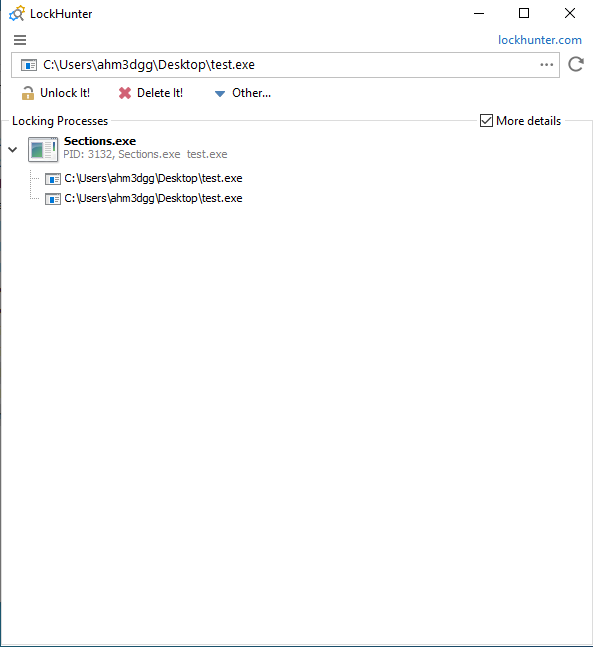
Now when you choose “Unlock Selected Process”, it will close both the file and section handle.
Debugging the project
While developing and debugging this project I hit a lot of BSODs. Also, because the user-mode app sends an IOCTL for every opened file (about 16,000 on my system), I couldn’t easily compare my driver’s output with the original driver’s, so I hooked DeviceIoControl, wrote the output buffer to a file, and had Claude generate a 010 Editor template to parse the structure (I didn’t have time to learn 010 scripting—I had enough to implement myself). Using that template helped me spot a bug in the data I was sending.
Anyway, here it is. I think 010 Editor is a great tool.
//------------------------------------------------
//--- 010 Editor v1.0 Binary Template
// File: HUNTER_FIND_FILENAME_RESPONSE.bt
// Purpose: Parse array of HUNTER_FIND_FILENAME_RESPONSE structs
//------------------------------------------------

// Type definitions
typedef byte    BOOLEAN;
typedef uint16  UINT16;
typedef uint32  UINT32;
typedef uint64  UINT64;
typedef uint64  PVOID;  // 64-bit pointer (change to uint32 for 32-bit targets)
typedef wchar_t WCHAR;

typedef struct {
    BOOLEAN     FilePathPresent;
    UINT16      Type;
    UINT16      Size;
    PVOID       DeviceObject;
    BOOLEAN     LockOperation;
    BOOLEAN     DeletePending;
    BOOLEAN     ReadAccess;
    BOOLEAN     WriteAccess;
    BOOLEAN     DeleteAccess;
    BOOLEAN     SharedRead;
    BOOLEAN     SharedWrite;
    BOOLEAN     SharedDelete;
    UINT32      Flags;
    UINT64      CurrentByteOffset;
    UINT32      Waiters;
    UINT32      Busy;
    WCHAR       FilePath[256];
    BOOLEAN     DiskVolumePresent;
    UINT16      DeviceObject_Type;
    UINT16      DeviceObject_Size;
    UINT32      DeviceObject_RefCount;
    PVOID       DriverObject;
    UINT32      DeviceObject_Flags;
    UINT32      DeviceObject_Characteristics;
    UINT32      DeviceObject_DeviceType;
    WCHAR       DiskVolumePath[256];
} HUNTER_QUERY_FILE_OBJECT_INFO_RESPONSE <read=ReadEntry>;

// Display function - shows filename in the tree view
string ReadEntry(HUNTER_QUERY_FILE_OBJECT_INFO_RESPONSE &e) {
    if (e.FilePathPresent)
        return WStringToString(e.FilePath);
    return "<no filename>";
}

// Calculate number of entries from file size
local uint64 entrySize = sizeof(HUNTER_QUERY_FILE_OBJECT_INFO_RESPONSE);
local uint64 numEntries = FileSize() / entrySize;

// Parse the array
HUNTER_QUERY_FILE_OBJECT_INFO_RESPONSE entries[numEntries] <optimize=true>;
Potential DoS vulnerability in the driver
To close this post (it’s already quite long): there is a denial-of-service vulnerability in the original driver that can lead to a BSOD.
If you look back at the original driver, it trusts the user-mode application and assumes it only receives file object pointers, then reads from them. That’s unsafe. The author should validate the pointer—for example with ObGetObjectType as we did—and ensure it’s a file object before using it, returning STATUS_INVALID_PARAMETER otherwise. Not doing so can cause a PAGE_FAULT_IN_NONPAGED_AREA bugcheck.

That’s it.
~ ahm3dgg